Book a Demo

Finance AI Feature

Account mapping AI that turns ERP exports into a governed finance model.

Finance AI helps teams profile ERP trial balances, translate local account descriptions, normalize signs, suggest IFRS standard mappings, validate the P&L, and publish a controlled Finance Semantic Model.

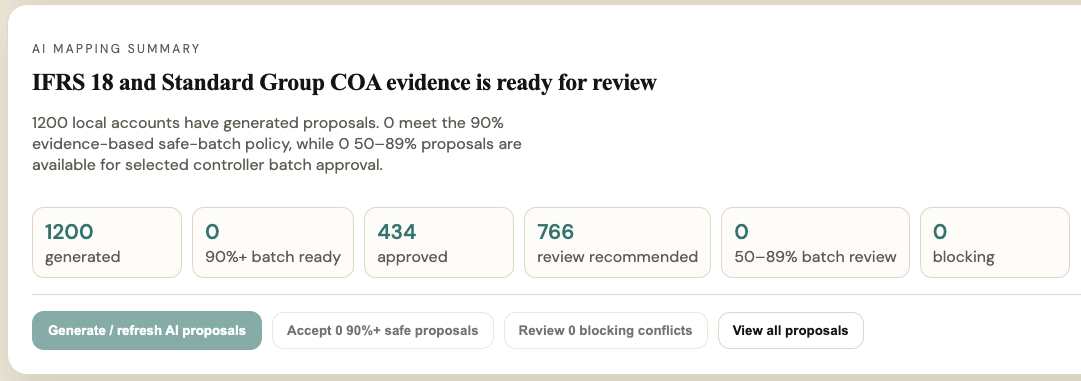
Product workflow previewIFRS 18 preview with before and after reporting impact

Problem

What finance teams are trying to fix

New finance implementations often start with scattered local charts of accounts, multiple languages, inconsistent signs, and unclear mapping rules before any monthly close or group reporting workflow can work reliably.

Why it matters

Why this workflow deserves structure

Almost every finance team needs account harmonization, even when they do not need consolidation. A governed mapping workflow becomes the entry point for Monthly Close, Consolidation Lite, Variance Analysis, Estimate, and Management Pack.

Before / After

What changes when the workflow is structured.

BeforeAfter
Local account descriptionsTranslated semantic account names
Unknown sign conventionNormalized revenue and expense signs
Manual mapping spreadsheetAI suggestions with explainability
Uncontrolled mapping changesDraft, published, and archived versions

Typical results

Credible outcomes without hard promises.

Finance teams typically use Account Mapping AI to:

  • harmonize local ERP account lists
  • increase mapping coverage
  • detect material unmapped accounts
  • publish a reviewed Finance Semantic Model

How it works

A controlled workflow from source data to reviewed output.

01Upload
02Profile
03Detect
04Normalize
05Map
06Validate
07Review
08Publish

Key capabilities

Built around the work controllers and CFOs repeat every month.

Language detection and translation

ERP profile detection

Sign normalization

Explainable IFRS mapping suggestions

P&L and net income validation

Semantic integrity checks

Mapping history and rollback

Typical finance workflow

The real monthly process this feature is designed to support.

Step 1

ERP upload

Controllers upload a trial balance or chart of accounts from NetSuite, SAP, Business Central, Visma, Procountor, or Excel.

Step 2

Data profile

AI detects language, ERP profile, sign convention, entity scope, currency, and account count before mapping.

Step 3

Mapping suggestions

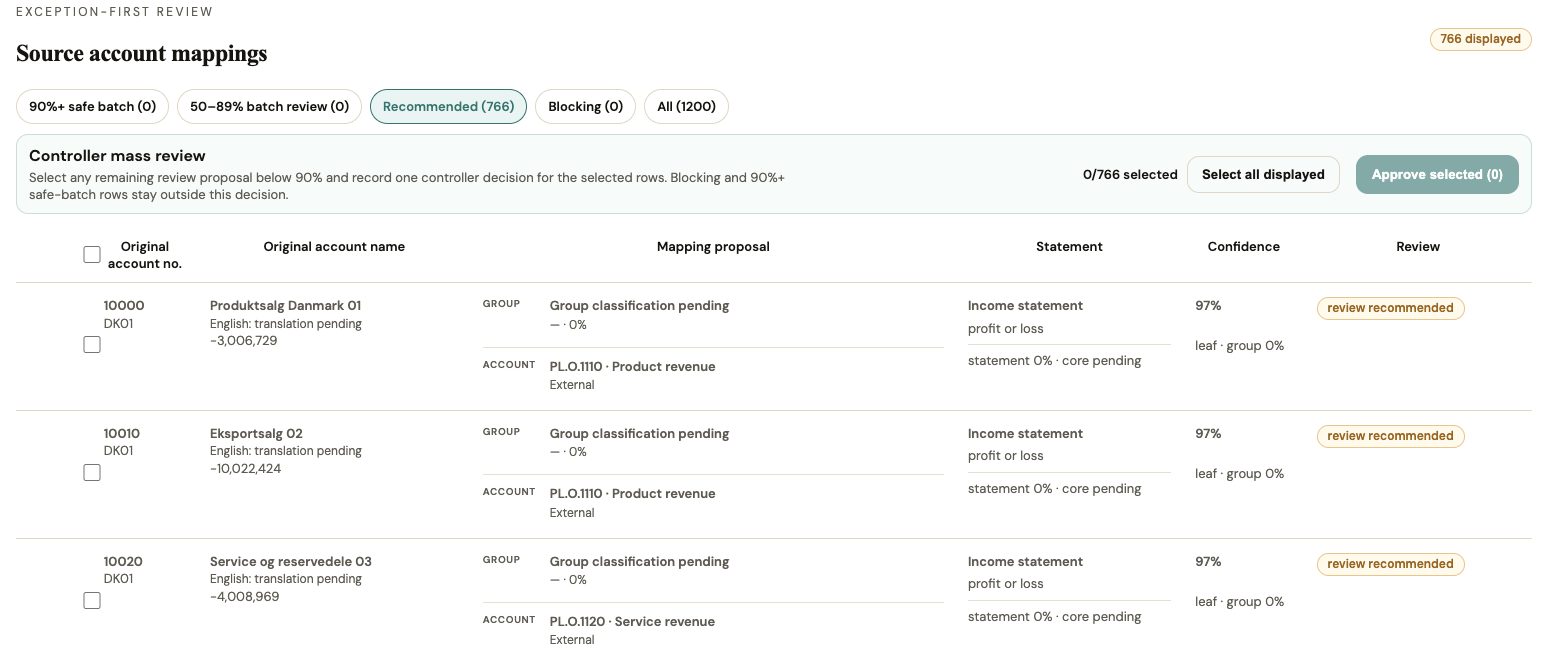
The system suggests standard IFRS mappings with confidence, evidence, and alternative options.

Step 4

Validation

P&L, net income, duplicate mappings, unmapped accounts, IC detection, FX consistency, and semantic integrity are checked.

Step 5

Controller review

Finance users review explanations, override suggestions, and approve the draft mapping.

Step 6

Semantic publish

The reviewed mapping is published as the Finance Semantic Model used by downstream workflows.

Related workflows

Shows how this feature connects to the broader finance process.

  1. 01ERP Upload
  2. 02Finance Semantic Model
  3. 03Monthly Close
  4. 04Consolidation Lite
  5. 05Variance Analysis
  6. 06Management Pack

Screenshots

Product views that show the workflow, not just a feature list.

Actual product viewIFRS 18 preview with before and after reporting impact
Actual product viewEvidence audit view showing sources, confidence, and traceability controls

Who is it for

Designed for finance teams accountable for the monthly truth.

  • CFOs
  • Group Controllers
  • Financial Controllers
  • Finance Managers
  • FP&A teams
  • Accounting Managers

Inputs & roadmap

Start with practical finance inputs. Direct system integrations are roadmap items.

Available input paths

  • ERP exportsInput
  • ExcelInput
  • CSVInput

Planned integrations

  • SAPPlanned
  • OraclePlanned
  • NetSuitePlanned
  • Microsoft DynamicsPlanned
  • AAROPlanned
  • OneStreamPlanned
  • Power BIPlanned

Planned integrations are based on customer demand and implementation priorities.

FAQ

Common questions about Account Mapping AI.

What is Account Mapping AI?

It is a Finance AI Workspace onboarding module that profiles ERP account data, suggests standard finance mappings, validates the result, and publishes a reviewed Finance Semantic Model.

Does it replace controller review?

No. AI prepares suggestions and validation checks, but finance users review, override, approve, and publish the mapping.

Why is validation important?

The mapping should not be published until the trial balance, signs, net income, material accounts, and semantic integrity are consistent enough for reporting.

Related features

Connected workflows inside Finance AI Workspace.

Practical finance experience

Built around real finance workflows.

Designed for finance teams that need practical account harmonization before reporting, consolidation, variance analysis, and forecast workflows can work reliably.

Trust

Built for finance workflows that need control, review, and accountability.

Built on Google Cloud
Tenant isolation
Audit trail
Role-based access
AI with human review
GDPR-aware operating model

Book Demo

Review Account Mapping AI against your real finance workflow.

Use the public page for discovery. The actual workspace remains protected behind login.